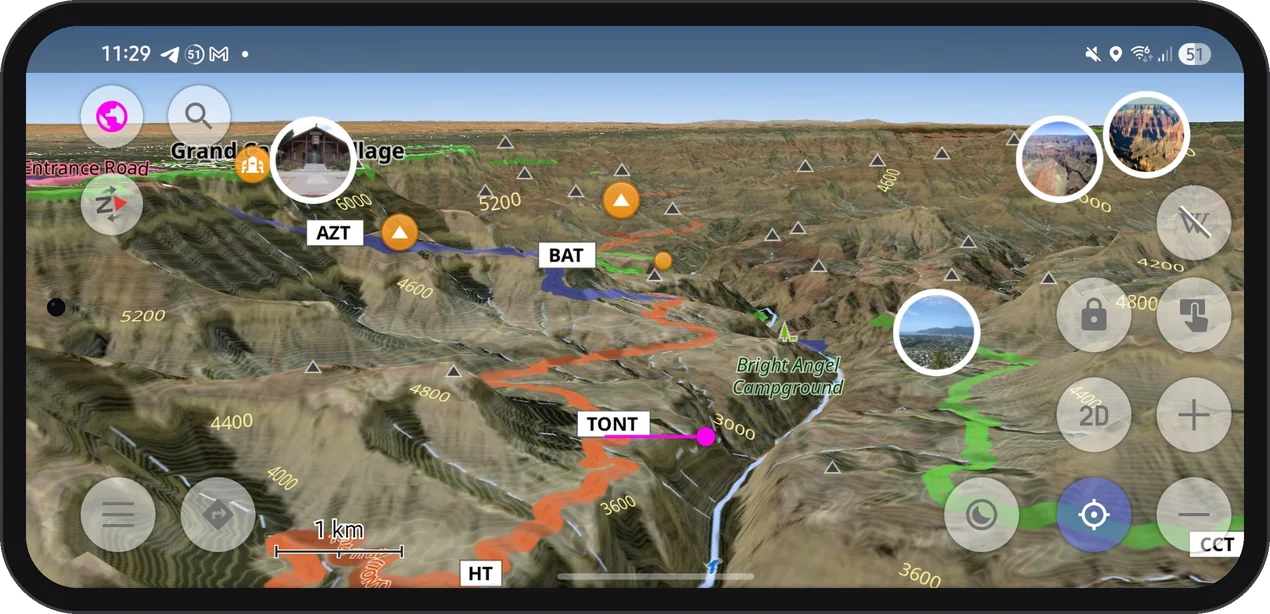
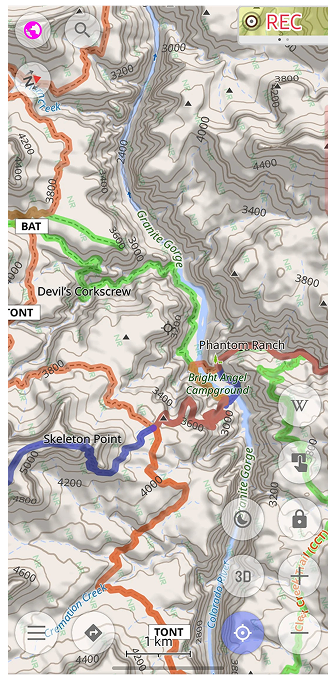
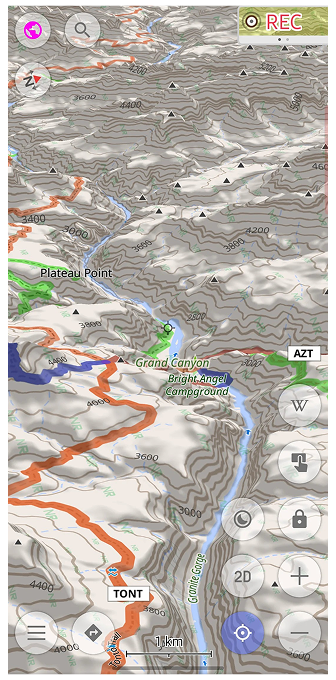
Sharper 3D relief and contour lines for the USA, Alaska, Canada and Mexico: new terrain data with 10–30 m resolution.
If you hike, ski, or drive in North America, your OsmAnd terrain may already be much sharper than you think. Since spring 2026, terrain maps and contour lines for the United States (including Alaska), Canada, and Mexico are built from high-resolution national elevation data. If you have not updated these maps since then, you are still looking at the old, smoother relief.
The new maps use elevation data with about 10 m resolution in the mainland United States and about 30 m in Alaska and most of Canada and Mexico. In practice, that means smaller ridges, narrower gorges, and steeper cliffs show up where the map used to smooth them out.
Few places test a terrain map like the Grand Canyon. Seen from above, the side canyons branch out in fine detail, and the contour lines follow every bend of the walls down to the Colorado River.
Tilt the map into 3D, and the canyon rises off the screen: Plateau Point, Skeleton Point, and the trail down to Phantom Ranch sit right where the terrain says they should.
Terrain maps are stored on your device, just like the rest of your OsmAnd maps. Once downloaded, the relief, contour lines, and 3D view keep working without an internet connection, which is handy at the bottom of a canyon, where signal is rarely part of the scenery.
Terrain maps downloaded before May 2026 still contain the old data. Open the Updates tab in Maps & Resources: if terrain or contour line maps for these regions are listed, update them. There is no need to delete the old files first. If you do not have them yet, download the Terrain map (3D) and Contour lines for the regions you need. Terrain and contour line maps require OsmAnd Maps+ or Pro; 3D relief requires OsmAnd Pro.
If something looks off or you have questions, contact OsmAnd support at support@osmand.net, or visit the Support page for more help options.
We appreciate your interest in us and thank you for taking the time to read this article. Join us on social media to keep up to date with the latest news and share your experiences. Your opinion is important to us.
Every night across southern Iraq, hundreds of gas flares burn over some of the largest oil fields on earth. They torch associated gas that could light millions of homes — in a country where those same homes get a few hours of grid power a day and the rest from diesel generators. The gas is burned because capturing it was never built. The flames are visible from space, yet on the ground almost no
Every night across southern Iraq, hundreds of gas flares burn over some of the largest oil fields on earth. They torch associated gas that could light millions of homes — in a country where those same homes get a few hours of grid power a day and the rest from diesel generators. The gas is burned because capturing it was never built. The flames are visible from space, yet on the ground almost no one is counting them.
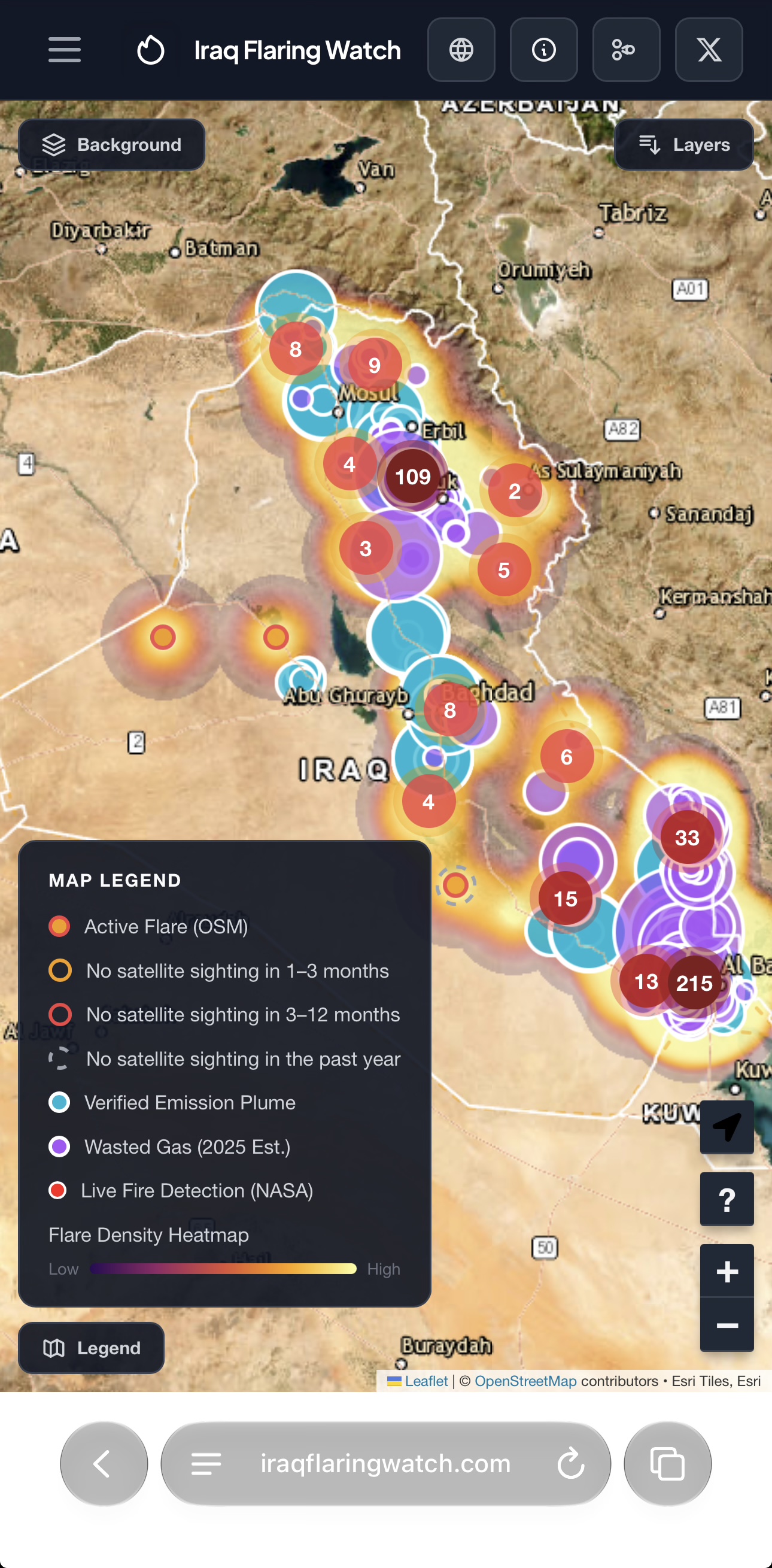
So I built Iraq Flaring Watch to count them in public — a live map of Iraq’s flaring, what it’s wasting, and who it’s affecting. This diary is about how it came together, and why OpenStreetMap ended up at the centre of it.
What it is
Iraq Flaring Watch is a single-page map that pulls open scientific data together in one place:
OpenStreetMap
the flare locations themselves — every flare on the map is an OSM man_made=flare node, so what you see is what mappers have put on OSM. There are two modes: a preloaded layer (a saved Overpass snapshot committed to the repo) that keeps load off Overpass and gives me a stable baseline to spot vandalism against, and a Live OSM option that pulls the current data straight from Overpass in real time.
NASA FIRMS (VIIRS)
near-real-time satellite fire detections, so you see what the satellites saw in the last few days, not a static snapshot.
Carbon Mapper
satellite methane and CO₂ plume detections (Tanager), showing which flares are leaking as well as burning.
World Bank
global flaring data, for the volumes and the national baseline.
WorldPop
the population raster, intersected with flare buffers to estimate the people living within 5 km of a flare.
Leaflet.js
the open-source engine that draws it all, with no proprietary basemap and no API gatekeeper.
Not one of those sent me an invoice. A single person, working evenings, can take open satellite data, open demographic rasters and open economic datasets, put them on an open map, and hold an oil industry’s waste up to daylight. That’s the part that still amazes me.
Where OSM comes in
Building the map made me confront how blank Iraq’s industrial layer is on OSM. Some of the largest oil fields on earth sit in the south, and large stretches of them are, on the map, empty desert. Gas-processing plants, flare stacks, oil gathering stations, storage depots — huge, permanent installations — simply aren’t there.
Iraq Flaring Watch turned out to be the perfect fix for that, because a persistent flare is a facility announcing its own coordinates every night. So the project became a mapping engine as much as a monitoring one:
A flare shows up as a persistent hotspot over a spot OSM thinks is bare.
I cross-check it against what’s already mapped. OpenInfraMap is my first lens — it renders OSM’s power and oil/gas layer beautifully, so I can see at a glance whether anything near the flare already exists. Overpass Turbo is the audit next to it, querying the area to see exactly what’s tagged and how.
I open the spot in satellite imagery, find the facility that’s obviously there, and trace it into OSM — or fix what’s already there and mistagged.
The flaring data and OSM correct each other: the fires point me at infrastructure to map, and the infrastructure I map turns an anonymous heat signature into a named, located, correctly-tagged thing anyone can use.
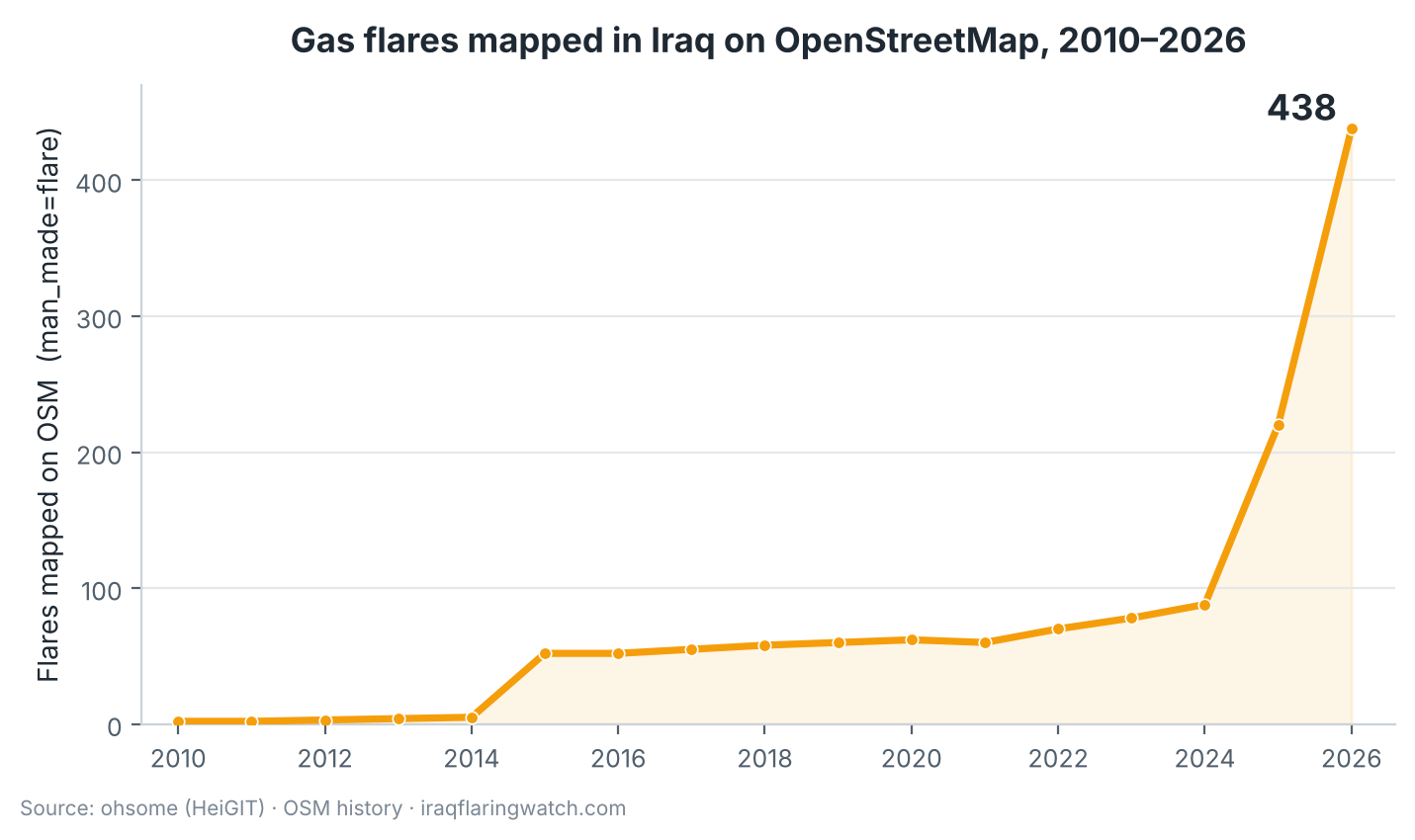
You can see the effect in OSM’s own history. The number of flares tagged man_made=flare in Iraq sat in the low tens for years; through the Iraq Flaring Watch work it has climbed to 438 today, and most of that recent jump is flares I traced after a satellite detection pointed me at them.
Count of man_made=flare within Iraq over OSM history. Source: ohsome (HeiGIT).
Open all the way through
I could have kept this private. But a flaring map built on a proprietary basemap and a closed dataset is a dead end — nobody can check it, nobody can extend it, and the day I stop maintaining it, it’s gone. So the project is open at every layer:
The data in is open — OSM (the flare locations themselves, via Overpass), NASA FIRMS, Carbon Mapper, World Bank and WorldPop.
The infrastructure I discover goes into OSM, the one layer I contribute back to and the one that outlives the project. A gas-processing plant or gathering station I add because of a flare detection is there for a transport mapper, a humanitarian team, an air-quality study, an OpenInfraMap user — whoever needs it next.
The code out is open too. Iraq Flaring Watch is on GitHub under the MIT licence at github.com/rawazrauf/iraq-flaring-watch. The map itself is a serverless index.html — no backend; it reads OSM flares either from a preloaded Overpass snapshot or live from Overpass — but behind it sits a small pipeline of open queries I wrote to turn raw data into the figures on the map. A Google Colab script buffers every flare by 5 km, clips the WorldPop raster and sums the population to get who lives nearby; another script pages the Carbon Mapper API for Tanager methane and CO₂ plume detections over Iraq; a notebook matches NASA VIIRS fire detections to individual flares; and the World Bank GGFR volumes feed the national economics. Every query, and every JSON output it produces, is committed to the repo, so the whole chain from open data to published number is auditable and reproducible — not a black box.
There’s nothing Iraq-specific about the machinery. Swap the bounding box and the national figures and the same stack becomes Flaring Watch for Nigeria, Libya, Algeria, Turkmenistan — anywhere gas is burning and nobody’s counting. If you want to stand one up for your country, please do; that’s what the licence is for.
How you can help
Iraq’s energy infrastructure is one of the most under-mapped layers anywhere, and there’s a clear, high-impact order to work in. If you map in Iraq — or want to — here’s where to start:
Add man_made=flare for flares that aren’t mapped yet. Iraq Flaring Watch shows you exactly where they’re burning; cross-check against satellite imagery and OpenInfraMap, then tag the flare stacks that are still missing. This is the single most useful thing, and the chart above is literally the scoreboard.
Add industrial=wellsite polygons around existing man_made=petroleum_well points. Iraq has over 3,000 oil wells mapped as points, but only around 1,000 have their wellsite drawn as a polygon (you can see the gap on OpenInfraMap). Tracing the wellsite footprint around a well point turns a dot into a real, measurable facility.
Add the rest of the missing oil, electricity and water infrastructure. Open OpenInfraMap over Iraq and fill in what’s absent — refineries, gas-processing plants and pipelines on the oil-and-gas side; power plants, substations and transmission lines on the electrical side; treatment and pumping stations on the water side. For the oil and gas facilities, the flare data is a free, precise guide to where to look.
Op mijn mapping tochten kom ik ook plekken tegen die ik wel van een foto zou willen voorzien. Maar hoe doe je dat nu, dit is het resultaat van mijn zoektocht over hoe dit te doen met Wikimedia Commons en wikidata.
de lokatie
De lokatie is een oude brug vlakbij Mirthos op kreta (Gps volgt) geohack.toolforge.org/geohack.php?pagename=File:Stone_bridge_near_Mirthos_01.jpg&p
De aanleiding
Op mijn mapping tochten kom ik ook plekken tegen die ik wel van een foto zou willen voorzien. Maar hoe doe je dat nu, dit is het resultaat van mijn zoektocht over hoe dit te doen met Wikimedia Commons en wikidata.
Lees de voorwaarden goed door en zet het vinkje bij “skip this step in the future” klik nu op “Next”
Selecteer de foto die je wilt uploaden, en kies toevoegen. (Je hoeft de foto(s) niet een makkelijke naam te geven, dit wordt automatisch gedaan in stap 7)
Als de foto(s) zijn ingeladen kun je verder door op “Continue” te klikken.
Beantwoord de vragen over de rechten van de foto(s) en klik op “Next”
Vul per foto gedetailleerde informatie in over de foto(s)
Als je meerdere foto(s) van de poi hebt kun je het beste een nieuwe categorie aanmaken die duidelijk weergeeft waar de poi zich bevindt en wat het is. ( bijvoorbeeld: Stone arch bridge near Mirthos)
Voor de lokatie moet je kijken in je foto app (Ik gebruik hiervoor google foto) om in de info de gps coordinaten te vinden.
Bij meerdere fotos kun je de gegevens van de eerste foto kopiëren naar de andere fotos.
Klik op “publish files” om het af te ronden.
Je krijgt nu de links naar de foto(s), bij 1 foto is deze link handig, bij meerdere fotos gebruik je beter de aangemaakte categorie.
Writing the script or speech then heading out station. I need hotel for two night. At the one you bring your guests. New York, Manhattan’s wherever my senses go. I boarding pass please? I will be at Atlanta Airport tomorrow before noon
Writing the script or speech then heading out station. I need hotel for two night. At the one you bring your guests. New York, Manhattan’s wherever my senses go. I boarding pass please? I will be at Atlanta Airport tomorrow before noon
Die KonGeoS ist die Konferenz der Geodäsie-Studierenden der Hochschulen im DACH-Raum und findet zweimal jährlich statt. Ziel ist es die Studierenden der 24 Geodäsie-Fachschaften aus Deutschland, Österreich und der Schweiz in einem fachlichen und auch persönlichen Austausch miteinander zu vernetzen. Die mehrtägige Veranstaltung ermöglicht aktuelle The
KonGeoS - Konferenz der Geodäsie-Studierenden
Die KonGeoS ist die Konferenz der Geodäsie-Studierenden der Hochschulen im DACH-Raum und findet zweimal jährlich statt. Ziel ist es die Studierenden der 24 Geodäsie-Fachschaften aus Deutschland, Österreich und der Schweiz in einem fachlichen und auch persönlichen Austausch miteinander zu vernetzen. Die mehrtägige Veranstaltung ermöglicht aktuelle Themen aus Studium und Beruf zu diskutieren, Fachvorträge zu hören, Erfahrungen zwischen Hochschulen auszutauschen, in Arbeitsgruppen an Themen zu arbeiten sowie das Exkursionsangebot zu Unternehmen, Behörden und Forschungseinrichtungen zu nutzen, um Kontakte zu potenziellen Arbeitgebern und Berufsverbänden zu knüpfen. Das Programm ist auf der Webseite zusammengefaßt. Die KonGeoS tourt, ähnlich wie die FOSSGIS-Konferenz, durch den DACH-Raum. Vom 15. bis 17. Oktober 2026 fand die KonGeoS an der Hochschule Mainz statt.
Beim Ausstellerforum am Freitagnachmittag informierten FOSSGIS-Mitglieder über Open-Source-GIS und OpenStreetMap und den FOSSGIS-Verein. Zahlreiche Studierende kennen schon QGIS oder OpenStreetMap, hatten jedoch noch keine Berührungspunkte mit FOSSGIS e.V., das Interesse an der FOSSGIS-Konferenz war hoch sowie auch die Sticker auf großes Interesse stießen.
Danke an Anja Eisert (Konferenzorgateam, Team Vernetzungstreffen), Robin Durner (OpenTransportCommunity, OSM), Kai-Christian Bruhn (Hochschule Mainz) und Thomas Bentler (BKG) für den Einsatz am FOSSGIS-Infostand.
FOSSGIS e.V. Infostand auf der KonGeoS an der Hochschule Mainz
OpenStreetMap und FOSSGIS sind das Zugangstor zu nachhaltiger Geoinformation. Um noch mehr Menschen davon zu begeistern, trafen sich
vom 02.-04. Oktober 2026 wieder 25 Aktive aus der deutschsprachigen OpenStreetMap- und FOSSGIS-Community zum FOSSGIS-OSM-Communitytreffen im Linuxhotel in Essen. Diesmal erwies sich die Mobilität der Deutschen Bahn als besond
FOSSGIS-OSM-Communitytreffen Nr. 26
OpenStreetMap und FOSSGIS sind das Zugangstor zu nachhaltiger Geoinformation. Um noch mehr Menschen davon zu begeistern, trafen sich
vom 02.-04. Oktober 2026 wieder 25 Aktive aus der deutschsprachigen OpenStreetMap- und FOSSGIS-Community zum FOSSGIS-OSM-Communitytreffen im Linuxhotel in Essen. Diesmal erwies sich die Mobilität der Deutschen Bahn als besonders nachhaltig, indem sie die Ankunft einiger Teilnehmenden nach erlebnisreichen Rundreisen besonders weit in die Zukunft verlegte. So erreichten die letzten Teilnehmerinnen das Treffen gegen Ende der Geisterstunde. Nichtsdestotrotz (oder gerade deshalb) wurde auch dieses Treffen wieder ein voller Erfolg!
Das Besondere an diesen Treffen, welches eine Mischung aus Hackathon, Vereinsarbeit, Netzwerktreffen und Ideenwerkstatt ist, war der erfreulich hohe Anteil von Teilnehmerinnen. Einige waren zum ersten Mal dabei, wie Nora, die ihre persönlichen Eindrücke im Wiki beschrieben hat. Fränze Kellig hat mit ihrem Besuch beim Arbeitstreffen ihren Dienst angetreten und das Wochenende genutzt, um sich zu informieren und die Einarbeitung zu starten. Wir freuen uns, dass wir Euch, wie die anderen neuen Teilnehmerinnen, für den FOSSGIS und OpenStreetMap begeistern konnten!
Gruppenfoto am Samstag
Die besprochen Themen planten wir in einer Startsession nach dem Frühstück, der Ablauf entstand wieder gemeinschaftlich aus aktuellen Fragestellungen. Arbeitsgruppen nutzten den erweiterten Kreis um zusätzliche Impulse und Ideen zu bekommen. Folgende Themen wurden besprochen:
Vereinsarbeit
Die AG Öffentlichkeitsarbeit dess FOSSGIS e.V. traf sich zu einer Session, in der verschiedene anstehende Aufgaben beleuchtet und besprochen wurden.
So ging es um die Ausgestaltung und Umsetzung des CartoHack - ein Format, welches zusammen mit der DGfK weitergeführt wird, indem regelmäßig in einer Onlinesession etwas Kartographisches demonstriert wird.
Die Smart Country Convention stand unmittelbar bevor. Torsten Friebe hatte mit seinem Unternehmen lat/lon einen Stand im OpenSource Park der OSBA gebucht und wollte bei dieser Gelegenheit den FOSSGIS e.V. bewerben und um eine Präsentation gebeten. Die zu präsentierenden Inhalte wurden besprochen.
Die Unterstützung für OSM-Stammtische/ in Form von Werbung über Mastodon und Vorlagen für eigne Werbung wurden besprochen sowie dass eine Anleitung zur Organisation solcher Treffen aufgeschrieben werden möchte. Weitere Themen waren die Optimierung der Social Media Interaktion des FOSSGIS e.V und seiner Community sowie die Diskussion um die Idee des OSM-Maskottchens.
Unterstützend für die Einarbeitung von Fränze war die Session “FOSSGIS e.V. visualisieren” sowie eine Diskussionsrunde um die Werte, die wir mit dem FOSSGIS e.V verbinden, welche von Katja angestoßen wurde.
Die AG Öffentliche Ausschreibung mit FOSS besprach Ideen zum Thema des Panelgesprächs auf der nächsten FOSSGIS-Konferenz und startete eine Runde zur Zusammenarbeit von FOSSGIS mit BKG und ZenDIS. Ziel soll sein, die Open Source Geocommunity besser zu vernetzen und zu informieren. Insbesondere soll das Repository OpenCode.de für Geotools eine vom FOSSGIS und BKG unterstütze Kuratierung sowie zusätzliche Keywords erhalten. Die soll öffentliche Verwaltungen bei Beschaffungsprozessen zu unterstützen. Eine Strategie des gemeinsamen Vorgehens wurde besprochen.
Passend hierzu diskutierte eine andere Gruppe zur Frage “Wie unterstützen wir Projekte beim Wegzug von GitHub & Co” darüber welche Repositories die Souveränität für FOSSGIS-Projekte gewährleisten und wo und wie der FOSSGIS e.V. unterstützen sollte.
Der Erfahrungsaustausch zu aktuellen Entwicklungen und zur Panoramaxinstanz wurde fortgesetzt. Marc schildete seine Vorgehensweise und gab nützliche Hinweise.
Hartmut macht sich Gedanken um den Nachbau der OpenSeaMap im Mapnik, um den OpenSeaMap-Stil auch für den Kartendruck mit print.get-map.org anbieten zu können.
Die Idee, OpenStreetMap als beste Karte für den Nico Rüpke-Kartographie-Preis, der im Rahmen der DGfK verliehen wird, vorzuschlagen, wurde diskutiert.
Florian bereitet eine Präsentation für Menschen vor, die nicht mit Open Source vertraut sind und sammelt Input.
Paul hat seinen Job als GIS-Koordinator ein einer Stadtverwaltung begonnen und die Gelegenheit genutzt sich von den Anwesenden hilfreiche Tipps und ein Update zu aktuellen Themen zu holen.
Auch wenn das Wochenende gefühlt kurz war, wurden viele Themen besprochen und vorangetrieben. Die Anwesenden wissen die offenen und konstruktiven Gespräche sehr zu schätzen. Gearbeitet wurde im großen und kleinen Seminarraum, Kaminzimmer oder einfach im Garten auf der Wiese. Dazu kamen die traditionelle Pizza am Freitagabend, gemeinsames Kochen und Essen mit spontanen Gesprächen über allerlei Themen. Samstag gab es noch einen Kinoabend mit einem unterhaltsamen Vortragsvideo von den Datenspuren über die Untersuchung von Drohnen in der Ukraine.
Wir danken den Teilnehmerinnen und Teilnehmern für die tollen Beiträge und die tatkräftige Unterstützung bei der Organisation.
Ganz besonders danken wir dem Linuxhotel für die Gastfreundschaft!
Morgenstimmung über der RuhrSesssion auf der WieseInspiration für diesen Artikel.
I’ve recently found myself with a lot of free time without internet access, and what better to do than improve OpenStreetMap!
JOSM has the capability of “editing offline”, that being that it can download and upload OpenStreetMap data whenever you’d like so if this was simple POI editing then I’d be fine: download the OSM data beforehand in JOSM, make my edits on a blank back
The problem
I’ve recently found myself with a lot of free time without internet access, and what better to do than improve OpenStreetMap!
JOSM has the capability of “editing offline”, that being that it can download and upload OpenStreetMap data whenever you’d like so if this was simple POI editing then I’d be fine: download the OSM data beforehand in JOSM, make my edits on a blank background and then upload when I have an internet connection again.
But this leaves out aerial imagery, by default JOSM streams this from tile servers, you can look at these URLs in Edit -> Preferences -> Imagery.
Others’ work
The method I have found to get offline aerial imagery is based off of an old forum post which recommends using KDE Marble to download tile data, and then point JOSM at that downloaded data using a file:// link.
This method works! And is the inspiration to mine but there is one fatal flaw in KDE marble that makes it unsuitable for this - it maxes out at zoom 16, inadequate for most mapping activities. I looked in to changing this arbitrary limitation in their source code, but I instead found a much simpler solution…
The breakthrough
Someone has (quite possible vibe-coded) a tool called MapTilesDownloader that fits the bill quite nicely. It can download to arbitrary zoom levels and, as it’s a Python script, it can be easily modified to download from imagery sources other than the ones it comes with.
It’s usage is simple: git clone the repository (git clone https://github.com/AliFlux/MapTilesDownloader.git) then install it’s dependencies: Pillow and Pyvips using pip and run it with python src/server.py and open the displayed URL in your browser. If you want to download Bing or Esri imagery then this is all you need to do, but I needed more obscure imagery.
To add custom imagery to this tool you can modify the sources dict in src/UI/main.js with an imagery URL obtained elsewhere, I got mine from the aforementioned JOSM preferences. The format used for pre-existing ESRI imagery is what most tile servers will use but you can use any of the imagery sources there as an example.
Using this imagery in JOSM
To use the imagery obtained using MapTilesDownloader in JOSM, you simply go to the JOSM imagery settings (Edit -> Preferences -> Imagery) and add a TMS source (plus button on the right) filling in the max zoom that you downloaded and then the URL is the path to the images prefixed with file://. This path is output in the console while the maps are being downloaded, for example on Linux it might be file:///home/<yourUserName>/Downloads/MapTilesDownloader/src/output/1792334342142/{zoom}/{x}/{y}.png with the last three arguments being automatically replaced by JOSM. Save and then your new imagery will be available under Imagery -> <the name you entered>
I hope this information will be of use to someone! Please don’t download too big of a bbox using the imagery downloader tool… And happy mapping!
Two tagging proposals, related to graffiti, are open for voting until 26 October 2026. Evyy is proposing a dedicated tag, shop=graffiti, for shops specialising in spray cans, markers, stickers, and other street art supplies, which have often been tagged as shop=craft or shop=paint in the past. Flappiegrrr is proposing to use leisure=graffiti_wall to record places where graffiti may be sprayed legally, and to describe individual walls using the key graffiti_wall=*.
Community
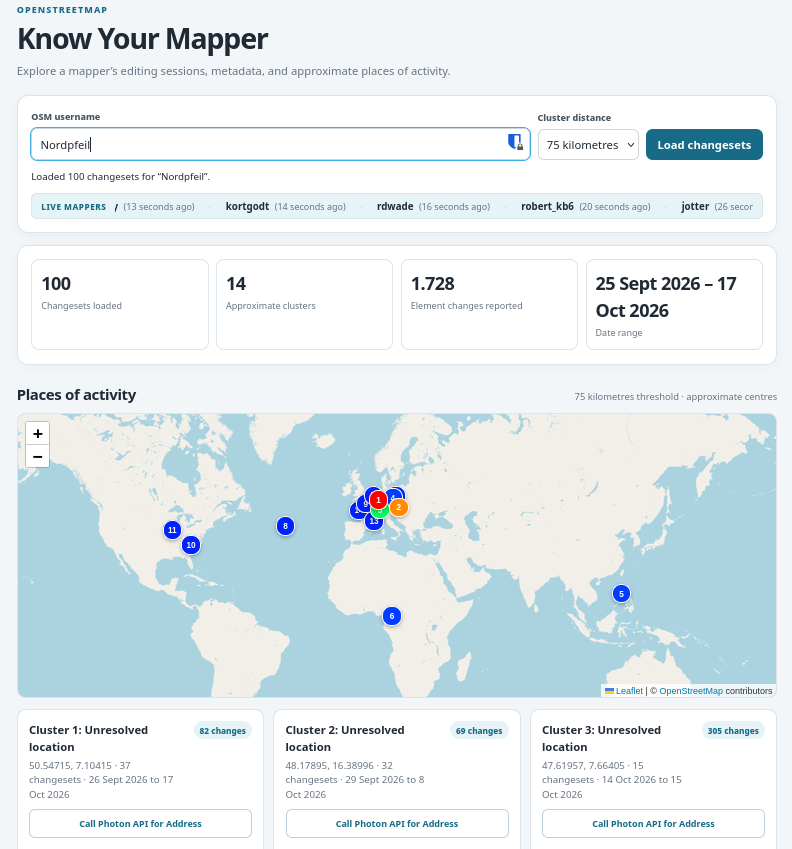
[1] Altilunium has developed ‘Know Your Mapper’, a web app that explores an OSM mapper’s editing sessions and approximate areas of activity.
The small team behind OpenClimbing: Jan Václavík, Pavel Zbytovský, and Fabian Weisshaar, have created their second bot proposal to clean up climbing-related tags in OpenStreetMap. Running with assistance from Mateusz Konieczny, the bot aims to improve the consistency and quality of OSM climbing data. OpenClimbing uses this information to power its specialised map with integrated topos for the climbing community.
Keagan van Rooyen described how he decided to contribute code to the CoMaps project and is currently working on several additional features for the Android Auto platform.
Events
Sozialheld*innen has developed the a11y-Score, a score that makes the accessibility of public services in any chosen region comparable, based on open data from OpenStreetMap (we reported earlier). They will be presenting it at an online event on Monday 26 October 2026, from 14:00 to 15:00 CEST.
Open Energy Transition will host a one-hour webinar introducing EarthPV, a tool that combines free Sentinel-2 imagery, the TerraMind geospatial foundation model, OpenStreetMap, open building datasets and human mapping to identify rooftop and ground-mounted solar installations above 10 kWp. The webinar will present the methodology and prototype results using Pakistan as a case study, and explain how the globally applicable workflow can support other contexts and research.
Stefan Keller announced ► that there will be a PostGIS and PostgreSQL course on 5 and 6 November 2026 at OST’s Rapperswil campus in Switzerland. The two-day practical course covers PostGIS database administration, data import and conversion, spatial SQL, modern SQL features, performance tuning, and extensions such as pgRouting and pgVector.
The eighth State of the Map Latin America will take place in person in Mexico City, Mexico, from 27 to 29 October 2026. You can find the full session schedule here .
OSM research
HeiGIT presented a new paper introducing ACTION, a framework for making remote sensing and volunteered geographic information, including OpenStreetMap data, more useful for decision-making. The paper explored how combining satellite observations with local knowledge can support more transparent, reliable, and actionable geospatial workflows.
Maps
Eugene Muravjev has built an interactive 3D map of Yas Island. The map uses OpenStreetMap data for roads, buildings, parks, and shorelines, supplemented by building footprints from Overture and Microsoft, and vegetation data from Copernicus Sentinel and ESA WorldCover. Major landmarks, including Ferrari World, Yas Waterworld, Etihad Arena, and the F1 circuit plus its tunnels, are modelled by hand using photographs.
Goldilocks Map shows how many days a year the weather matches your own idea of comfortable (temperature range, humidity limit, and sunshine) for every place on Earth. The interactive map is built with MapLibre GL JS on OpenFreeMap tiles (OpenStreetMap data) and its climate numbers are checked against NOAA station records.
The Milan City Council’s Citizens’ Advisory Committee on Active Mobility and Accessibility has created a uMap showing all the cycle racks in the municipality of Milan.
Sven Geggus added support for shelters, except those with sleeping=no, to OpenCampingMap (via Mastodon).
The Birding Discovery team has developed birding.live, a free website that helps users discover common bird species and nearby birding locations worldwide using OpenStreetMap data.
TectonicPlateMap.org launched an global interactive web map built with MapLibre GL JS and OpenStreetMap vector tiles. The web app visualises all 52 tectonic plates from the PB2002 dataset, active fault lines, real-time USGS earthquakes, and Smithsonian GVP volcanoes.
Vienna Living Map is a free housing map of Vienna built on OpenStreetMap: Protomaps vector tiles, OSM points of interest, and cycleways. For every address it calculates the hours of direct sun per floor from OSM building outlines and the City of Vienna’s measured roof model.
OSM in action
Rasmus Jaakonmäki released Fontavio, an app that maps drinking water, refill taps, toilets, showers, self-service laundries, dump stations, and marina pump-outs across Europe, USA, and Canada. The data come from various sources, including OpenStreetMap, national open datasets, and places added directly by Fontavio users. Each place records its source while the OpenStreetMap data are credited under the ODbL licence.
The ALIS Project is developing ALIS, an open-source survival game set in real cities. In its latest prototype, the team has built a virtual Manhattan using Unreal Engine 5 and OpenStreetMap data, featuring 109,486 buildings, 84,096 road segments, and 28,265 trees.
Open Data
Wikimedia Enterprise has released an open geospatial dataset that contains 17 million OpenStreetMap elements linked to Wikidata, Wikipedia, and Wikivoyage, as Parquet and GeoParquet files on Hugging Face and Kaggle.
Software
Jake Low reported several MapRoulette security vulnerabilities that exposed OpenStreetMap access tokens, API keys and users’ email addresses. He took the application offline for around 15 hours, revoked all credentials and released version 4.11.0 with fixes on 7 October. Users must sign in again and re-authorise MapRoulette with OSM, but do not need to change their passwords.
OpenHistoricalMap’s vector tiles have had many improvements over the past few months, including Simple 3D Buildings, goodies for golf mappers, and non-administrative boundaries (such as time zones, dioceses, and self-governing indigenous territories). Some of these are breaking changes for existing third-party stylesheets.
Chris has been developing an AI-assisted OpenStreetMap mapping tool for Windows using Rust, Python, and WGPU for 3D features, with SAM 3 and YOLO models to detect features in satellite imagery from multiple sources, and is seeking community feedback.
Felis Pimeja has been working on the OSM Simple 3D Editor, a browser-based editor for OpenStreetMap buildings and indoor objects.
Martin Lange has developed TRAMP (Track and Route Analysis, Mapping and Planning), a free and open-source desktop application for Windows, Linux, and macOS that allows users to explore GNSS tracks and plan routes on OpenStreetMap-based maps using Valhalla or OSRM for routing and Photon or Nominatim for search.
HeiGIT introduced the Sketch Map Tool on LinkedIn, a low-tech solution to support community mapping through offline data collection, digitisation, and georeferencing of local information. The tool enables users to create and analyse paper-based maps using OpenStreetMap data and satellite or drone imagery from OpenAerialMap.
Releases
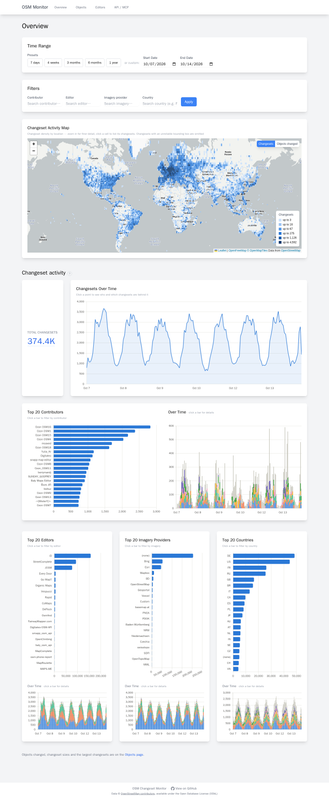
Over the past months Johan Morganti has been building a tool to explore every OpenStreetMap changeset since 2005, see trends over time, and drill down to who did what. This tool ingests OSM’s minutely changeset and diff replication from planet.osm.org, plus the full changeset history: 190 million changesets and 19 billion object changes, from 2005 to a few minutes ago.
HeiGIT announced the release of ohsome 2.0, introducing major improvements to the ohsome API, ohsome quality API, and dashboard for faster analysis and extraction of historical OpenStreetMap data. The article highlighted the new features and provided guidance for migrating from v1 to v2.0 before the legacy services are discontinued on 30 November 2026.
Other “geo” things
Safwat Halaby developed maplibre-gl-three, a library that enables developers to add 3D models and 3D tiles at geographic locations in MapLibre GL JS.
Working with voluntary and community organisations for some is a very important way to do geography. In a guide published by the Royal Geographical Society, there are case studies done in collaboration with community and voluntary organisations. The PDF is available.
Open Geospatial Solutions has developed RustGIS, a free and open-source GIS in pure Rust for mapping, analysing, and sharing geospatial data.
GMXreported how a couple got lost in Lost Dutchman State Park in the US state of Arizona after using Google Maps. The pair later called for rescue and were airlifted out by helicopter. In a similar incident, one person died in Yogyakarta, Indonesia, after a car carrying 16 people veered off the road while attempting to navigate a steep incline, following directions from Google Maps.
The United Nations Office for Disaster Risk Reduction has developed the STOP DISASTERS game. Through play, users explore how decisions about where people live, how buildings are constructed, how ecosystems are protected, and how communities prepare affect what happens when a hazard strikes. The game was originally made as part of the 2006–2007 World Disaster Reduction Campaign, ‘Disaster Risk Reduction Begins at School’.
The Tiroler Tageszeitungreported (paywalled) on a rival’s map, which has assigned names to places, mountains, and paths in Tyrol and Bavaria that nobody in the local area recognises, such as the ‘Schmusbichl’ in Kaunerberg. Local historians and the Tyrolean Nomenclature Commission are having to use old maps to fight against renaming at the click of a mouse. Donald Trump would probably welcome this as a model to follow; after all, he too has shown that a golf course can quickly be given a new name if you just have the right map in hand. In OpenStreetMap, by contrast, names continue to be assigned based on local knowledge.
Upcoming Events
Country
Where
Venue
What
When
🇧🇪
Gent
TomTom Belgium
Maptime Ghent
2026-10-19
Missing Maps London Mid-Month for Advanced Mappers (no training provided) (Online) [eng]
2026-10-20
🇫🇷
Lyon
Tubà
Réunion du groupe local de Lyon
2026-10-20
🇩🇪
Bonn
Dotty’s
205. OSM-Stammtisch Bonn
2026-10-20
🇩🇪
Chemnitz
Kaffeesatz, Chemnitz
OSM-Stammtisch Chemnitz
2026-10-20
🇬🇧
City of Edinburgh
Guildford Arms
Edinburgh Social
2026-10-20
🇩🇪
Online
Lüneburger Mappertreffen (online)
2026-10-20
🇫🇷
MJC de vienne
Réunion du groupe local de Vienne
2026-10-21
🇮🇹
Milano
Formazione Wikimedia Italia - OpenStreetMap: modifica tramite sito e tramite app
2026-10-21
🇩🇪
Karlsruhe
Schwarzer Kater
Stammtisch Karlsruhe
2026-10-21
OSM US Mappy Hour: Mapping Accessible Trails
2026-10-21
🇬🇷
[Online] OSM Greece - Διαδικτυακή συνάντηση της ελληνικής κοινότητας
2026-10-21
pk
CUI Islamabad
Training on OpenStreetMap (OSM Pakistan)
2026-10-22
🇩🇪
Berlin
Online
EarthPV: Mapping Photovoltaics
2026-10-22
🇸🇰
Bratislava
Prírodovedecká fakulta UK Bratislava
Missing Maps mapathon Bratislava #14
2026-10-22
🇮🇳
Ernakulam
Edapally, Kochi
Kochi Mapping Party 2026
2026-10-24 - 2026-10-25
🇮🇹
Bologna
Liceo Copernico di Bologna
Linux Day 2026 a Bologna
2026-10-24
🇮🇹
Parma
Officine On/Off Parma
Linux Day 2026 Parma
2026-10-24
🇫🇷
Inclu K’fé
Cartopartie à Orx
2026-10-24
🇩🇪
Berlin
Wikimedia e.V. Tempelhofer Ufer 23-24,10963 Berlin
OSM Hackweekend Berlin-Brandenburg 10/2026
2026-10-24 - 2026-10-25
🇸🇪
Uppsala
Datorföreningen Update
Mapping meetup in Uppsala
2026-10-25
🇮🇳
Noida
Noida
OSM Delhi NCR Mapping Party No.33 (Noida)
2026-10-25
a11y-Score: ein OSM-Barrierefreiheitswerkzeug
2026-10-26
CartONG : Mapathons en ligne 2026-2027
2026-10-26
🇮🇹
Milano
Formazione Wikimedia Italia - OpenStreetMap: tasking manager
Θα ήθελα να σας προσκαλέσω σε διαδικτυακή συνάντηση της ελληνικής κοινότητας του OpenStreetMap για να συζητήσουμε διάφορα θέματα περί της κοινότητας και την πρόοδο άλλων που τρέχουν ήδη.
🗓️Ημερομηνία και ώρα: Τετάρτη 21 Οκτωβρίου, 20:00
🔗Σύνδεσμος δωματίου συνάντησης: BigBlueButton
Το BigBlueButton, για όσους δεν ξέρουν, είναι το λογισμικό συναν
Καλησπέρα άπαντες,
Θα ήθελα να σας προσκαλέσω σε διαδικτυακή συνάντηση της ελληνικής κοινότητας του OpenStreetMap για να συζητήσουμε διάφορα θέματα περί της κοινότητας και την πρόοδο άλλων που τρέχουν ήδη.
Το BigBlueButton, για όσους δεν ξέρουν, είναι το λογισμικό συναντήσεων που χρησιμοποιεί το OSMF. Για τη σύνδεση στο δωμάτιο, αρκεί να βάλετε το όνομα σας, δεν είναι απαραίτητη κάποια εγγραφή.
1. Who are you, what do you do, and how did you first get involved with OpenStreetMap?
I’m Sofia Pahaoja, a Finnish software engineer. I’ve been programming since I was young. I’d known about OpenStreetMap for a long time, but hadn’t used it much until I started working on Touch Mapper about ten years ago.
2. Can you tell us about Touch Mapper and what inspired you to create it? How did OpenStreetMap and 3D printing come together in the idea behind the project?
Touch Mapper is a website where you can create tactile maps for visually impaired people for free, if you print them yourself. Both 3D printing and embossing on paper are supported.
I created Touch Mapper because my partner was visually impaired, and spending time with her made me realize that there were virtually no usable tactile maps for that group of people, and that creating them from OpenStreetMap data wouldn’t be that difficult.
We were on vacation in Rome, and I wanted to explain to her the layout of the neighborhood around our hotel. But words couldn’t really convey it. About all I could say was, “It’s a maze of narrow streets.” There are simply no substitutes for a map, be it visual or tactile.
For many visually impaired people, being able to explore an area using a map offers an entirely new way of understanding their surroundings. A tactile map can be extremely useful in practical ways, but it can also offer the same joy that anyone might get from studying a map out of curiosity.
She was enthusiastic about the idea of Touch Mapper and played an important role in testing it throughout the initial development.
As far as I knew, there weren’t any other practical sources of map data besides OpenStreetMap. Google Maps existed, of course, but it didn’t offer the same access to reusable geographic data that I needed.
3. Touch Mapper uses OpenStreetMap data to create tactile 3D-printed maps. What makes OSM particularly well suited to this kind of accessibility project?
Besides being one of the few practical sources of map data, OSM has an important advantage: anyone can improve it.
Most maps generated using Touch Mapper are created by professionals who work with visually impaired people. If they find that important information is missing, they can add it to OpenStreetMap and then generate the map they need.
4. What have you learned about OpenStreetMap through working with it for Touch Mapper? Are there particular features or types of map data that are especially important when creating maps for people who are blind or partially sighted?
OpenStreetMap contains a wealth of information. Pedestrian paths are generally more important than roads for tactile maps, and sometimes those are missing. Pedestrian crossings are also important, but aren’t always mapped.
Another lesson has been that the geometry described by OSM isn’t always suitable for 3D printing. Roads and buildings can overlap, or the data may contain geometries that simply don’t make sense.
A visual map can tolerate all kinds of geometric imperfections, because it’s ultimately just drawing shapes on a screen. But a 3D-printed map needs to consist of physically valid, printable solids. Overlapping shapes, tiny gaps, and other geometric inconsistencies can cause problems when generating a printable model.
In practice, most of these issues can be handled automatically, but it requires treating the data as something that may need cleanup, and using heuristics to make tiny adjustments to the geometry.
5. You mention that missing buildings and other inaccuracies in OSM can affect the resulting maps. What challenges have you encountered with OSM data, and what could the OSM community do to make the map more useful for accessibility applications?
Generally, the biggest problem is simply missing data, whether that’s buildings, roads, or pedestrian paths. Users rarely complain about this, though. My impression is that they don’t expect the underlying map data to be perfect.
One important limitation is indoor mapping. Many practical needs of visually impaired people involve navigating indoor spaces, such as finding a particular store in a shopping mall.
Indoor spaces would probably require a rather different approach to tactile map creation. My impression is that the indoor mapping data available in OSM isn’t yet complete or consistent enough to make this a worthwhile addition to Touch Mapper, though I haven’t investigated the matter very thoroughly.
6. Touch Mapper shows one interesting way that OpenStreetMap data can be used beyond a traditional digital map. What other possibilities do you see for OSM in accessibility, tactile mapping, or other applications that the community might not have considered?
A recent addition to Touch Mapper is textual description of the selected area. This enables a visually impaired person to verify that they have selected the correct area for the map. But it could also answer questions such as “What points of interest are there near my home or place of work?”
Chatbots could also be an excellent interface for visually impaired people. Their text-based interfaces work well with screen readers and braille displays, allowing people to ask questions in natural language.
I’m not sure how much access chatbots currently have to OSM data, but questions like “Describe the walking route from my home to this bus stop”, “List the most important points of interest near this address”, or “Is there a park between the station and the library?” could benefit enormously from having API access or another way of querying structured OSM data.
Imagine a blind person who has just moved to a new neighborhood. They could ask a chatbot what’s around their new home, where the nearest shops and parks are, and how the streets connect to each other. They could then ask follow-up questions, gradually building a mental picture of the neighborhood without ever needing to see a map.
This would go beyond simply giving directions from one place to another. It would make exploring and understanding the geography of a place a much more accessible experience.
7. Looking ahead, what would you like to see happen with Touch Mapper and OpenStreetMap over the next 10–20 years, particularly in making geographic information more accessible to people with different needs?
Indoor maps, definitely. Finding your way around a shopping mall, an airport, or a university building can be very difficult without sight, and having good indoor map data could make a huge difference.
Routing is another possibility: step-by-step walking directions designed specifically for visually impaired people. This requires more than just knowing where the streets and paths are. Information about pedestrian crossings, stairs, entrances, and other details can be essential.
More broadly, I’d like to see geographic information become something everyone can explore, regardless of how they perceive the world. Maps are traditionally visual, but the underlying information doesn’t have to be presented visually. It can be turned into tactile maps, spoken descriptions, or interactive conversations.
I hope that in 10 or 20 years, a blind person will be able to explore an unfamiliar city with much the same freedom and curiosity as a sighted person looking at a map. OpenStreetMap could provide much of the data needed to make that possible.
Thank you, Sofia! It’s inspiring to see how OpenStreetMap can help make geographic information more accessible and give visually impaired people new ways to explore and understand the world around them.
Im Jahr 2023 war ich, Katja Haferkorn, das erste mal auf der Smart Country Convention und hatte es kurz in einem Blogpost festgehalten.
Nach dem Besuch der diesjährigen SCCON, die vom 13. – 15. Oktober 2026 in den Messehallen Berlin stattfand, ist die damalige Vermutung “Möglicherweise macht es Sinn als Verein zukünftig in irgendeiner Weise vertreten zu sein.” von vielen Seiten b
Im Jahr 2023 war ich, Katja Haferkorn, das erste mal auf der Smart Country Convention und hatte es kurz in einem Blogpost festgehalten.
Nach dem Besuch der diesjährigen SCCON, die vom 13. – 15. Oktober 2026 in den Messehallen Berlin stattfand, ist die damalige Vermutung “Möglicherweise macht es Sinn als Verein zukünftig in irgendeiner Weise vertreten zu sein.” von vielen Seiten bestätigt worden.
Open Source Park
Die Open Source Business Alliance (OSBA) hat einen Open Source Park organisiert und die geballte Open Source Kompetenz im OSS-Park versammelt.
Dort präsentierten sich Mitglieder der OSBA mit ihren Dienstleistungen und Lösungen.
Unter anderem war die Civitas-Connect-Community vertreten und präentierte ihre Lösung und Mitgliedspartnerschaften. Vielleicht präsentiert sich Cititas Connect auch auf der FOSSGIS 2027.
Eine für die FOSSGIS-Community interessante Initiative ist der Sovereign Cloud Stack, der von zahlreichen Dienstleistern angeboten wird.
Am Pretix-Stand hatte ich Gelegenheit mich zum Shopsystem, welches wir für die Konferenztickets und weitere Veranstaltungen einsetzen auszutauchen sowie das Team zur FOSSGIS-Konferenz nach Heidelberg einzuladen, da der Firmensitz in Heidelberg ist.
Open Source Park auf der SCCON 2026
FOSSGIS e.V. am lat/lon-Stand
Die lat/lon GmbH, auch Mitglied in der OSBA präsentierte sich an einem Stand.
lat/lon Gesellschaft für raumbezogene Informationssysteme mbH ist Mitglied im FOSSGIS e.V. und gab dem Verein Gelegenheit sich mit zu präsentieren sowie etwas Werbematerial auszulegen.
Der Stand war gut frequentiert, viele kamen gezielt, um sich Informationen zu Geofragen zu holen, ein Treffpunkt der FOSSGIS-Community entstand.
Das lat/lon-Team freute sich, dass Katja Haferkorn, als Vertreterin der FOSSGIS e.V. Koordinierungsstelle mit am Stand war und Fragen zum Verein und zur Konferenz beantworten konnte, u.a. ist der Oktober ein günstiger Zeitpunkt, um Werbung für die Konferenz zu machen. So manche freute sich Informatioen zum Call for Participation oder eine Erinnerung an die Einreichung zur FOSSGIS 2027 zu erhalten, die Einreichefrist endet am 01.11.2026. Es ging darum, welche Themen für die Konferenz interessant sind und was die Teilnehmenden von dieser riesigen Veranstaltung mitnehmen könnten.
Der lat/lon-Stand im OSS-Park entwickelte sich zum Treffpunkt der FOSSGIS-Community
Geothemen auf der SCCON
Auf der SCCON sind viele für die Geocommunity interessante Initiativen und Institutionen vertreten. Zahlreiche große Dienstleister, insbesondere KI- und Cloudanbieter bieten ihre Dienste an und an fast jedem Stand wird Digitale Souveränität versprochen. Wer hier versucht den passenden, digital souveränen Weg herauszufinden, lässt sich vom Zentrum für Digitale Souveränität (ZenDIS), der OSBA oder dem FOSSGIS e.V. beraten.
Das Bundesamt für Kartographie (BKG) war mit einem Stand dabei und präsentiert den Digitalen Zwilling Deutschland, die GDI-DE, die GEO.KI sowie weitere Projekte.
Unbedingt erwähnt sei Smart City Wuppertal, die mit einem großen, anschaulichen Modell von Wuppertal Aufsehen dahingehend erregt hat, dass dieses sowohl die städtische Infrastruktur, wie Straßen, Schwebebahn, Wupper, Siedlugen und Wald sehr schön darstellte und auch vorhandene Geodaten über einen Projektor projeziert wurden. Damit ist es möglich Echtzeitdaten oder auch Simulatonsdaten einzuspielen, es können Hochwasser-, Schattenwurfszenarien oder die Stadtbeleuchtung eindrucksvoll dargestellt werden.
Smart City Wuppertal im interaktiven Modell
FOSSGIS e.V. zur SCCON 2027 dabei?
Angenommen der FOSSGIS e.V. hat einen Stand im Open Source Park und präsentiert dort sein Spielfeld und die Player. Das könnte es dahingehend erfolgreich werden, dass wir gebündelte Geo-Kompetenz für Open Source zeigen, vielfältige Ansprechpartner verfügbar wären und es auch noch Spaß macht. Dies sollte innerhalb des Vereins besprochen werden, um einen passenden Auftritt zu erreichen.
Folien zur Info zum FOSSGIS e.V. (Klick für Folien als PDF)
Pierpoint is a small town in South Dakota. It’s now mapped: buildings, sidewalks, footpaths, alleys, power poles. There is probably more micro mapping to do but it’s on the map now.
Pierpoint is a small town in South Dakota. It’s now mapped: buildings, sidewalks, footpaths, alleys, power poles. There is probably more micro mapping to do but it’s on the map now.
I’m part of a small volunteer team that runs birding.live, a free site that helps people find birds and green spaces near them. Thought it made sense to introduce how the site leans on OSM data, and to say thanks.
What we do with OSM: geocoding and place search come through Nominatim with an identifying user agent, throttled through our own proxy. Nearby parks, woods and reserves are pla
I’m part of a small volunteer team that runs birding.live, a free site that helps people find birds and green spaces near them. Thought it made sense to introduce how the site leans on OSM data, and to say thanks.
What we do with OSM: geocoding and place search come through Nominatim with an identifying user agent, throttled through our own proxy. Nearby parks, woods and reserves are place queries framed from OSM data, mostly via Geoapify’s OSM-derived layer, and walking trails come from Overpass as named route relations for hiking, foot and walking. Plain paths only ever show up if their OSM tags carry a real signal like difficulty grading or waymarking, so road connectors and farm tracks don’t pretend to be trails.
Who it’s for: the site is a five minute route into birding for beginners. You type a place, see which birds have been reported around it recently from the eBird community, and get a map of parks, reserves and named trails to walk, all credited as OpenStreetMap contributors, ODbL.
Two things we want to improve, honestly: watching how the trail queries behave in areas with patchy tagging, and starting to give corrections back once we’re confident enough to do it properly. If you’ve got pointers on Overpass named-route queries, or you spot one of our pins naming something wrongly, that kind of eye is very welcome.
If you’re curious the site is birding.live and the code is at github.com/chocobar/birding. Thanks for the years of contributor effort behind every pin on our maps.
It occurred to me that some users of OpenStreetMap data cannot read Cyrillic script, so maps lacking name:en variables (or others using Latin letters) may have difficulty reading place names, highway names, and so on. I asked Copilot for help and after a few false starts it produced a PowerShell 7 script that converts Cyrillic script to Latin script.
I downloaded a PBF file for Uzbekista
It occurred to me that some users of OpenStreetMap data cannot read Cyrillic script, so maps lacking name:en variables (or others using Latin letters) may have difficulty reading place names, highway names, and so on. I asked Copilot for help and after a few false starts it produced a PowerShell 7 script that converts Cyrillic script to Latin script.
I downloaded a PBF file for Uzbekistan from Geofabrik, used osmconvert to convert it from PBF to OSM format, then ran the script on it. The OSM file was large (> 3Gb) and the script was done in about 12 minutes. I then used osmconvert to change it back to PBF format and fed it into splitter and mkgmap.
The GMAP folder when viewed in BaseCamp looks perfect, all Cyrillic characters have been changed to Latin characters. My mkgmap style sheets call for name:en in the first instance, if available, then fall back to intl_name, and in the final instance to name. If the name is in Cyrillic it is converted to Latin letters.
I have uploaded the PowerShell 7 script to Github. It should be modifiable for any non-Latin alphabet (next I will experiment with other nearby countries, like Georgia and Armenia).
It occurred to me that some users of OpenStreetMap data cannot read Cyrillic script, so maps lacking name:en variables (or others using Latin letters) may have difficulty reading place names, highway names, and so on. I asked Copilot for help and after a few false starts it produced a PowerShell 7 script that converts Cyrillic script to Latin script.
I downloaded a PBF file for Uzbekista
It occurred to me that some users of OpenStreetMap data cannot read Cyrillic script, so maps lacking name:en variables (or others using Latin letters) may have difficulty reading place names, highway names, and so on. I asked Copilot for help and after a few false starts it produced a PowerShell 7 script that converts Cyrillic script to Latin script.
I downloaded a PBF file for Uzbekistan from Geofabrik, used osmconvert to convert it from PBF to OSM format, then ran the script on it. The OSM file was large (> 3Gb) and the script was done in about 12 minutes. I then used osmconvert to change it back to PBF format and fed it into splitter and mkgmap.
The GMAP folder when viewed in BaseCamp looks perfect, all Cyrillic characters have been changed to Latin characters. My mkgmap style sheets call for name:en in the first instance, if available, then fall back to intl_name, and in the final instance to name. If the name is in Cyrillic it is converted to Latin letters.
I have uploaded the PowerShell 7 script to Github. It should be modifiable for any non-Latin alphabet (next I will experiment with other nearby countries, like Georgia and Armenia).
Usually users add 1500–2000 map notes per day. Yesterday (2026-10-13) one user added 6175 map notes. Yesterday all users added 7717 map notes. So one user added 80% map notes (one user added four times as many notes as all the other users combined).
Usually users add 1500–2000 map notes per day. Yesterday (2026-10-13) one user added 6175 map notes. Yesterday all users added 7717 map notes. So one user added 80% map notes (one user added four times as many notes as all the other users combined).
Over the past months I’ve been building v2 of an idea I’ve had for a while: a way to explore every OpenStreetMap changeset since 2005, see trends over time, and drill down to who did what. (v1 was a prototype built on Datadog; its code is here.
Links links links, show me the thing
➡️ osm-monitor.johan.sh ⬅️ ·
Code: github.com/johanmorganti/osm-monitor
♦
How does tha
Over the past months I’ve been building v2 of an idea I’ve had for a while: a way to explore every OpenStreetMap changeset since 2005, see trends over time, and drill down to who did what. (v1 was a prototype built on Datadog; its code is here.
It ingests OSM’s minutely changeset and diff replication from planet.osm.org, plus the full changeset history: 190 million changesets and 19 billion object changes, from 2005 to a few minutes ago.
Everything is public data :)
Tabs
Overview: changeset volume over time, top editors, imagery, countries, a density map
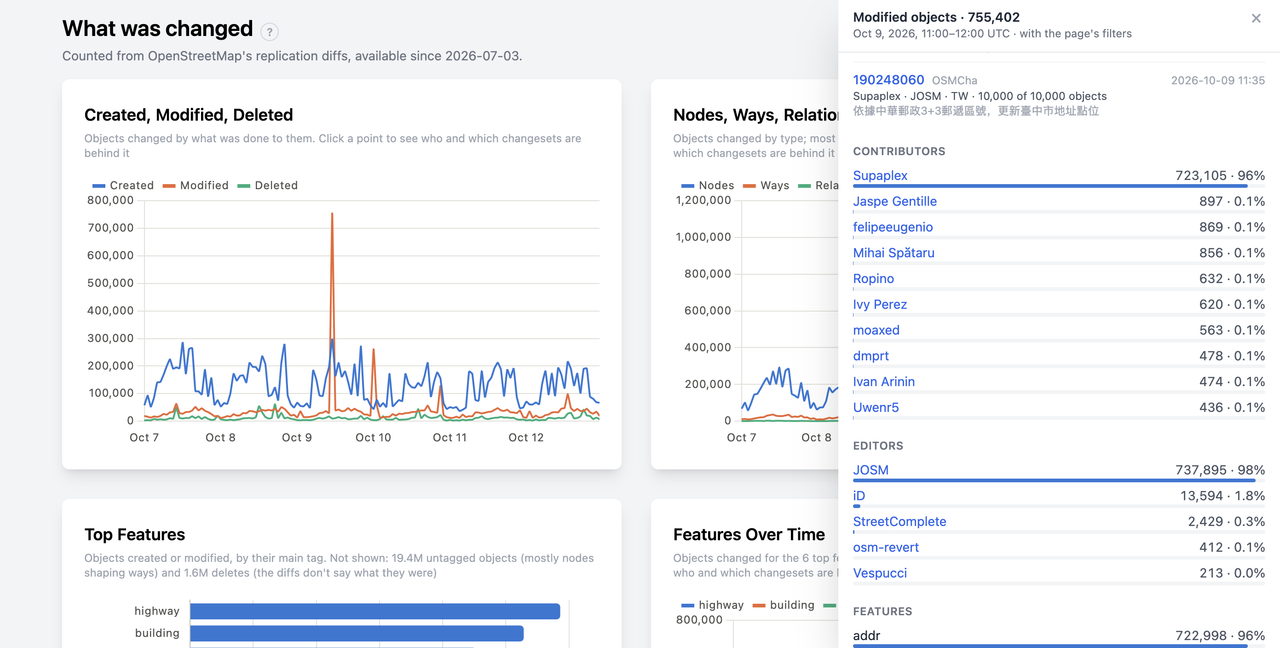
Objects: what was created, modified and deleted, by feature type, and you can drill down into a spike to see who made it and which changesets
Editors: how editing apps have evolved and who uses them
Everything is aggregated, and everything can be filtered:
Use filters to arrow by date, country, editor, imagery or contributor.
Good to know (as you saw above) : URLs have all the context (API parameters, date range, filters etc…). To show someone what you’re looking at, just send them the link.
How it differs from existing tools
Tools like OSMCha are great for reviewing individual changesets. OSM Monitor answers different questions: trends and aggregates over the whole history, which you can then narrow down to specific editors, countries or people. It only uses public changeset metadata and diffs that anyone can download from planet.osm.org.
Right now this runs on a laptop at my place, so expect the occasional downtime. I’ll see how much interest there is over the next few weeks and move to a proper server if people find it useful.
Feedback is very welcome: bugs, ideas, charts you’d like to see. Open an issue on the GitHub repo or reach me on any of the socials on my profile. Looking forward to hearing what you think!
Added Brice Road Park, which opened in early 2026. (Park has a Reynoldsburg address, although it is located within Columbus boundaries. 10-year partnership between Reynoldsburg Parks and Recreation Department and Columbus Recreation and Parks Department.)
October 14
Fixing my error about Little Jordan Run. It continues east and ends just s
October 11–17
October 13
Added Brice Road Park, which opened in early 2026. (Park has a Reynoldsburg address, although it is located within Columbus boundaries. 10-year partnership between Reynoldsburg Parks and Recreation Department and Columbus Recreation and Parks Department.)
October 14
Fixing my error about Little Jordan Run. It continues east and ends just south of Eastwood Street in the new developments. The stream that continues north is NOT Little Jordan Run, and is instead an unnamed tributary.
I have uploaded updates to Github of my personal scripts and style sheets for making Garmin-compatible IMG files out of OSM-origin PBF files (thank you, Geofabrik!), both for Central Asia (all five countries) and for the Russian Federation.
The Russian Federation style sheets render names of highways and POIs in both English and Russian to ease searching on a GPS unit, wherever a name:en
I have uploaded updates to Github of my personal scripts and style sheets for making Garmin-compatible IMG files out of OSM-origin PBF files (thank you, Geofabrik!), both for Central Asia (all five countries) and for the Russian Federation.
The Russian Federation style sheets render names of highways and POIs in both English and Russian to ease searching on a GPS unit, wherever a name:en variable is available. Both sets of style sheets render foreign diplomatic missions as well as various other POIs that for whatever reason other providers of IMG files omit.
I found that generating individual IMG files, each with its own family-id=* number in the mkgmap script, then merging them into a single file using GMapTool, allows the Garmin nüvi to list each map individually in MyMaps, which means they can be selected and deselected individually. Since the gmapsupp.img files can be quite large and thus slow to load (and for the nüvi processor to process, especially for older models) this is very handy. The Russia map is well over 2 gigabytes, and the Central Asia map is about 370 megabytes.
My Wintel desktop has 32Gb of RAM and runs on a 12th Gen Intel Core i9-12900K at 3.20 GHz. It processed the Central Asia maps in about 3 minutes start to finish, and the Russian Federation maps in about 20 minutes. In the script I set splitter to use 4Gb of RAM and mkgmap to use 16Gb. If your box has less RAM you will have to adjust those settings and your scripts will run longer.
I asked Copilot to rate nüvi models for compatibility with mkgmap-generated IMG files. This is the table Copilot returned:
I have been building an interactive 3D map of Yas Island, Abu Dhabi: uaemaps.com. It is a free, non-commercial side project.
♦
Every road, building footprint, park and shoreline comes from OpenStreetMap, with building outlines from Overture and Microsoft’s open footprints and greenery from Copernicus Sentinel and ESA WorldCover. On top of that the landmarks are modelled by hand f
I have been building an interactive 3D map of Yas Island, Abu Dhabi: uaemaps.com. It is a free, non-commercial side project.
Every road, building footprint, park and shoreline comes from OpenStreetMap, with building outlines from Overture and Microsoft’s open footprints and greenery from Copernicus Sentinel and ESA WorldCover. On top of that the landmarks are modelled by hand from photos: Ferrari World, Yas Waterworld, the Etihad Arena, the F1 circuit and its tunnels.
The map follows the real sun over Yas, lights up at night by OSM’s lit and use tags, and runs traffic on the real road graph, including bridges and tunnels from OSM’s bridge, tunnel and layer tags. Each place has its own page with opening hours and links.
Working with Yas in OSM showed me a few gaps: some new venues and gates were missing or a few hundred metres off. Where I could check them on the ground, I want to fix them in OSM too.
 OpenStreetMap Blog


 OpenStreetMap Blogs