Skip to the content
  • "The more that you read, the more things you will know. The more that you learn, the more places you'll go." - Dr. Seuss
Get Started
Imagine
Digital Landscapes for your personal wonder
  • About
  • Blog
  • CS Knowledge Base
  • Ebooks
  • Embed Link
  • Home
  • Imagine Blog
  • Links
  • OmniVision
  • About
  • Blog
  • CS Knowledge Base
  • Ebooks
  • Embed Link
  • Home
  • Imagine Blog
  • Links
  • OmniVision

CS Knowledge Base

  • Home
  • CS Knowledge Base
Kernel Yenileri
  • Comments
  • Immutable Page
  • Menu
    • Navigation
    • RecentChanges
    • FindPage
    • Local Site Map
    • Help
    • HelpContents
    • HelpOnMoinWikiSyntax
    • Display
    • Attachments
    • Info
    • Raw Text
    • Print View
    • Edit
    • Load
    • Save
  • Login

Kernel Kurcalama(Hacking)

  • Kernel Yenilerine Giriş_Sayfası

  • Kernel Kurcalama

  • Kernel Terimler_Sözlüğü

  • Kernel Belgeleme

  • Bir hata(bug) mı buldunuz?

  • Kernel Safari

  • SSS

Projeler

  • Kernel Değişim Kayıtları

  • Kernel Janitor

  • Kernel Danışman

Diğer Sayfalar

  • Bölgesel KernelNewbies

  • Kişisel Sayfalar

  • Gelişmesi eklenen Olaylar

Tercihler

  • E-posta Listeleri

  • Programlama Bağlantıları

  • Eski kernelnewbies sitesi

WikiWall Şablon

  • Giriş Sayfası

  • WikiSandBox

Wiki Bitleri

  • En son değişiklikler

  • Yardım İçerikleri

  • Bulma Sayfası

  • Statistics

  • Seyir Menusu

  • WikiWall

  • WikiWall

Navigation

  • RecentChanges
  • FindPage
  • HelpContents
KernelYenileri:
  • HelpOnDrawings

Working with Drawings

Contents

  1. Working with Drawings
    1. Basics
    2. Usage
    3. Examples
      1. Markup for a TWikiDraw drawing
      2. Rendering of a TWikiDraw drawing
      3. Markup for a AnyWikiDraw drawing
      4. Rendering of a AnyWikiDraw drawing
    4. .tdraw file format
    5. .adraw file format

Basics

Since MoinMoin 1.9 you can choose from two drawing tools: TWikiDraw and (new) AnyWikiDraw.

TWikiDraw is available in MoinMoin since quite a while and a bit outdated meanwhile. We still provide it for compatibility with existing drawings.

AnyWikiDraw is a special version for wikis of JHotDraw7, a successor of TWikiDraw with a modern user interface and a few very cool features.

Usage

Use this syntax for including a drawing on your page:

{{drawing:<name of your drawing>[.tdraw|.adraw]}}

Use .tdraw for TWikiDraw drawings and .adraw for AnyWikiDraw drawings. If you don't add an extension it will default to TWikiDraw.

If a drawing does not exist, you will see the attachment symbol instead of a drawing. A click on it will lead you to a page where the drawing applet gets started, so you can create a new drawing and save it.

When moin renders the wiki page afterwards, you'll see a rendered PNG of your new drawing.

If you click on the PNG rendering of an existing drawing, moin will invoke the drawing applet so you can modify it.

(!) In case you see some message asking whether you want to load the applet, you should confirm that.

Please play around with the drawing tools on your own, you will explore a lot of cool features.

E.g. add images to your drawings, play around with grouping, transparency effects and rotate everything by slowly double clicking on it.

Have fun!

Examples

Markup for a TWikiDraw drawing

{{drawing:twikitest.tdraw}}

Rendering of a TWikiDraw drawing
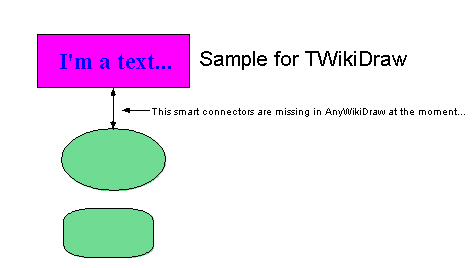
twikitest.tdraw

Markup for a AnyWikiDraw drawing

{{drawing:anywikitest.adraw}}

Rendering of a AnyWikiDraw drawing
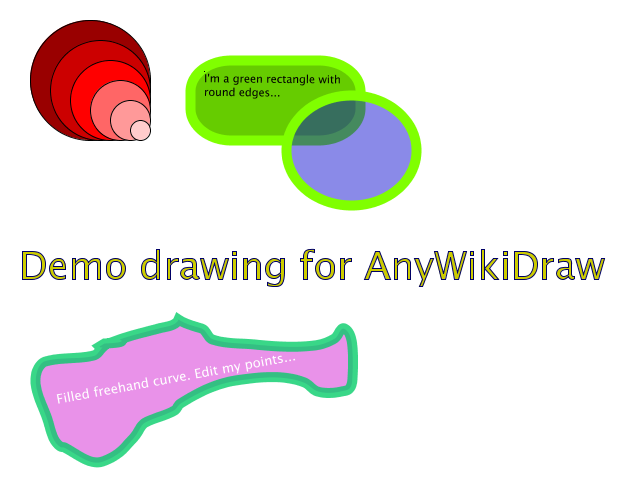
anywikitest.adraw

.tdraw file format

MoinMoin < 1.9 stored 3 files for each TWikiDraw drawing:

  • drawingname.draw (drawing file for TWikiDraw)
  • drawingname.map (for clickable drawings)
  • drawingname.png (PNG rendering of the drawing)

With MoinMoin 1.9 this was changed so that only 1 file is needed (please use moin migration data to convert existing data):

  • drawingname.tdraw

This .tdraw file is simply a tar archive that internally contains the 3 files (see above). The contained files are ever called drawing.* so they do not need to get renamed if the .tdraw file gets renamed.

.adraw file format

MoinMoin 1.9 now also supports AnyWikiDraw drawings and saves them into a .adraw tar file, which contains:

  • drawing.svg (SVG file for AnyWikiDraw)

  • drawing.png (PNG rendering of the SVG)

The contained files are ever called drawing.* so they do not need to get renamed if the .adraw file gets renamed.

  • MoinMoin Powered
  • Python Powered
  • GPL licensed
  • Valid HTML 4.01

Search

Recent Posts

  • Digital Art by Dasha K.
  • Music Lab: Jam Session by Simon S.
  • AP Computer Science Principles A – Slide Decks
  • What determines our intelligence
  • The Learning Zone

Archives

  • September 2025
  • July 2025
  • June 2025

Quick contact info

Lorem ipsum dolor sit amet, the administration of justice, I may hear, finally, be expanded on, say, a certain pro cu neglegentur. Mazim.Unusual or something.

2130 Fulton Street, San Francisco
support@test.com
+(15) 94117-1080

Categories

  • Artificial Intelligence
  • CodeHS
  • Computer Science
  • Digital Art
  • Education
  • Growth Mindset
  • Java
  • micro:bit
  • Minecraft Education
  • Python
  • Uncategorized
  • What Mr. Goldstein is currently working on
  • WordPress

Archives

  • September 2025
  • July 2025
  • June 2025
Copyright © 2025 | Powered by WordPress | formula theme by A WP Life